
Create Multiple Skillies
Did you know you're not confined to a single skilly guide? Think of any given skilly as its own identity, with its own personality and interaction style. You may find it beneficial to create additional skillies for particular subsets of your customer base, or for time-bound market opportunities, or any other reason where you'd like to show a different side of your organization's culture and communication style.
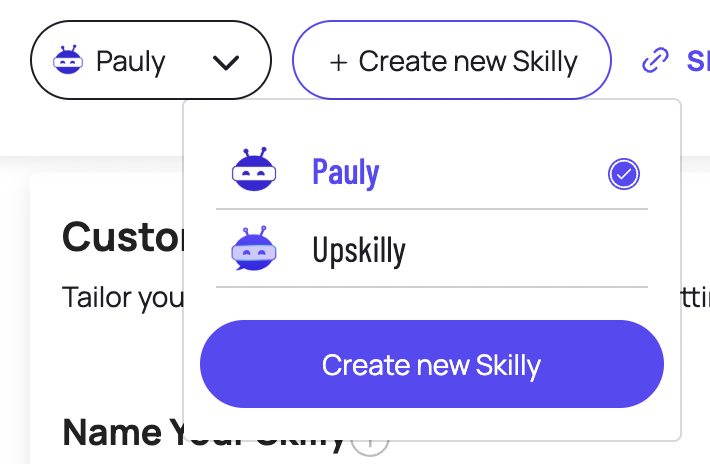
If you've already created your first skilly, then you already know how to create another. Just start by navigating to AI Agent > Customize, then click + Create New Skilly. After a few seconds of processing, you'll have an entirely new skilly identity to work with:

Giving It A Unique Identity
Beyond the obvious options to give your new skilly its own name, image et al, what you'll want to focus on is the Target Audience.
The Target Audience field is critical for your skilly to understand the kind of people it will be talking to, and how to talk to them. Let's say we're launching Pauly to represent the company at an industry conference, full of engineers and product designers; telling Pauly about those personas and guiding it to be more technical in its responses can afford your organization the ability to put this specific lens on all existing knowledge, without having to publish and promote dozens of new materials.

You can further emphasize the unique personality of this new skilly by adjusting its Opening Prompt and Starter Questions, since many users begin their skilly interactions by clicking on starter questions. On top of that, you can explore our Goals feature to give this skilly its own repertoire of links and outcomes to focus on during conversations.
Insights As Unique As Your Guide
One of the benefits of creating specialized skillies is that you can review their individual insights and analytics. So even if your primary AI guide is set up on your homepage to speak in broad strokes and embrace unstructured outcomes, you can have a second guide that is tightly focused on an entirely different set of calls-to-action (CTAs) and goals.
Navigating Between Skillies
With your newly added skilly, you can now swap between guides using the dropdown if you'd like to change any customization options.
Creating multiple skillies is that simple; take a look at our article on deploying your skilly to learn how you can make the most of your additional AI guides across communication channels.